
Holds now name what is blocking your container, and who reported it
A container is sitting at the terminal and something is stopping you from picking it up. Knowing only that much does not help you act. Is it a customs exam, a fee somebody needs to pay, paperwork still open with the carrier, or nothing blocking at all because the box is authorized to move under bond?
Which of those you are looking at decides whether you call the broker, pay a fee, or send a truck. Until now, answering it usually meant calling the terminal.
The POD Holds column now names every hold, shows whether it actually blocks pickup, and tells you which source reported it.
Every hold called by its name
Instead of one generic flag, each hold appears as its own chip with the name the industry uses for it.
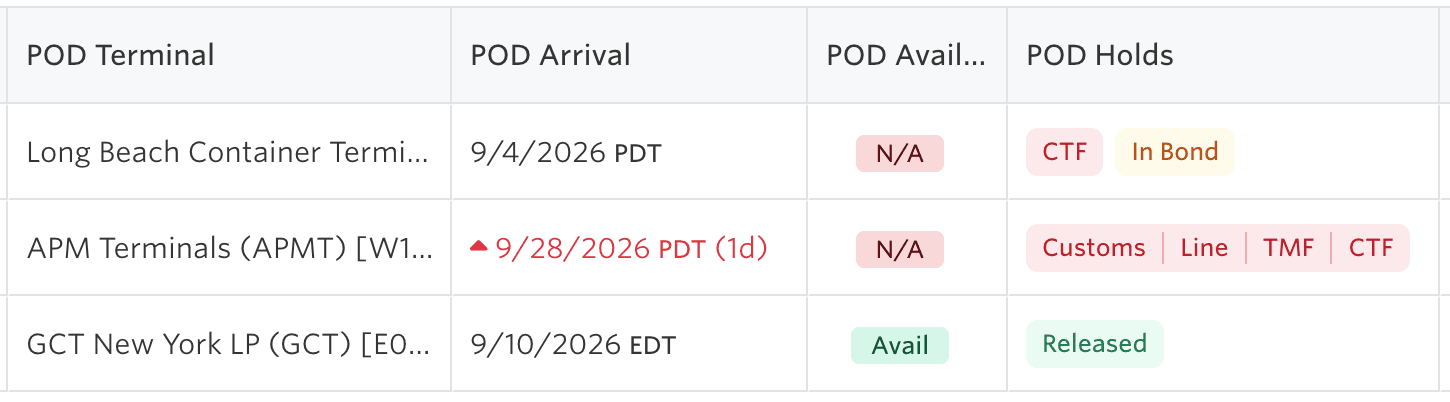
Customs, Line and Freight are the holds that follow the bill of lading, so they apply wherever you pick the container up. USDA, TMF, CTF and Terminal are reported by the pickup facility and appear only while they are active, so a container in Long Beach carrying a Clean Truck Fee hold says CTF rather than leaving you to guess.
When nothing is blocking, the cell reads Released.
One rule worth knowing: anything that is not an explicit release still blocks. If a source has told us nothing about a hold, that is not treated as a green light.
In bond is not the same as held
A container moving under bond is not cleared at this port, but it is authorized to move. Showing that as a Customs Hold made a routine in-bond move look like a problem, and sent people chasing customs brokers who had nothing to fix.
Bonded movement now renders in amber and is labelled for what it is, In Bond or Permit to Transfer, instead of red.
The gate only turns amber when every condition holding it permits bonded movement. A single exam or open documentation item alongside it keeps the whole thing red, so this can never quietly downgrade a real block.
Where each hold came from
Terminal49 reads release data from both terminals and shipping lines, and the two do not always say the same thing. Hovering a hold shows every observation behind it.
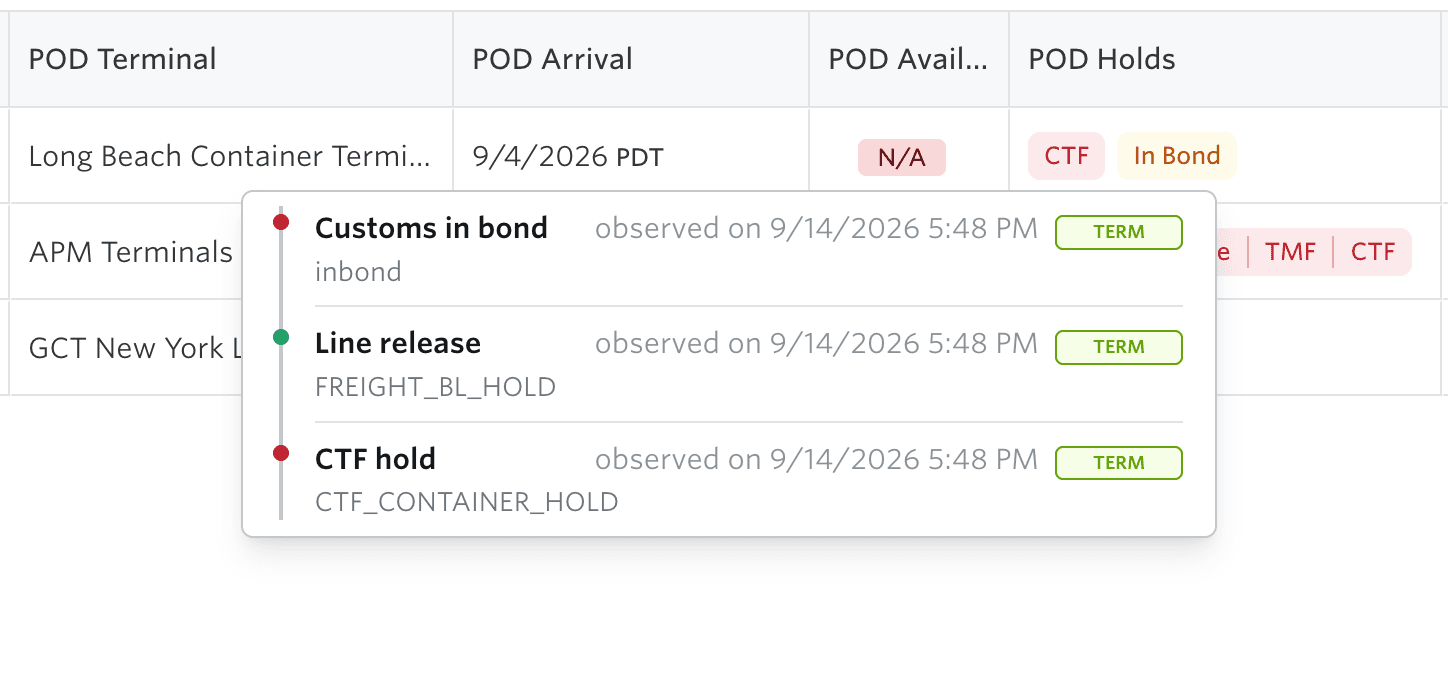
Each row gives you the hold in plain language, the source that reported it (Terminal or Shipping Line), when it was observed, and the source's own wording underneath. That last part matters when you need to quote the terminal back to itself: if the feed said CTF_CONTAINER_HOLD or FREIGHT_BL_HOLD, that is what you see.
Availability
This is on for every account, and there is nothing to turn on.
If a saved view or a workflow keys off the old single hold flag, the underlying field is unchanged, so nothing breaks.
For API users
Nothing you rely on today changes. The existing holds field and the hold-related webhook events keep their shape and their values, including the established freight and VACIS names.
The richer per-hold records behind this view are available on the V2 container resource but are still settling ahead of a general release, so treat them as preview rather than something to build on yet. Send us a note at support@terminal49.com if you want to work with them early.
